Enterprise AI Pricing, Privacy, and Security Comparison

Originally Published: March 29, 2026
Last Updated: June 13, 2026
By Tracey Birkenhauer, journalist and Chief Impact Officer, STACK Cybersecurity
Executive Summary
Enterprise AI pricing is no longer just a comparison of seat costs. By mid-2026, the real differences between platforms come down to how they handle data access, how usage is actually metered, and how well they integrate into existing business workflows.
OpenAI and Anthropic offer flexible, platform-based tools suited for analysis and custom workflows. Microsoft Copilot and Google Gemini embed AI directly into productivity suites, which changes both cost structure and security considerations. For most businesses, the deciding factor is not the model itself but how AI connects to internal data and how easily that access can be governed.
Key takeaway: The cost of enterprise AI is no longer defined by seat price alone, but by how much data you expose, how your users access it, and how heavily the system is used.
AI tools have moved from experiment to business infrastructure in a matter of years. For most companies, the question is no longer whether to adopt them but which ones to buy, how much they actually cost, and what data protections come with them.
The pricing structures for enterprise AI are genuinely complex, and comparing them on an apples-to-apples basis requires understanding not just monthly seat costs but how usage is metered, what triggers additional charges, and what the terms say about your data.
This post breaks down four major enterprise AI platforms: OpenAI's ChatGPT, Anthropic's Claude, Google's Gemini, and Microsoft's Copilot. The analysis is strictly from a business buyer's perspective.
Learn more about state AI laws governing usage.
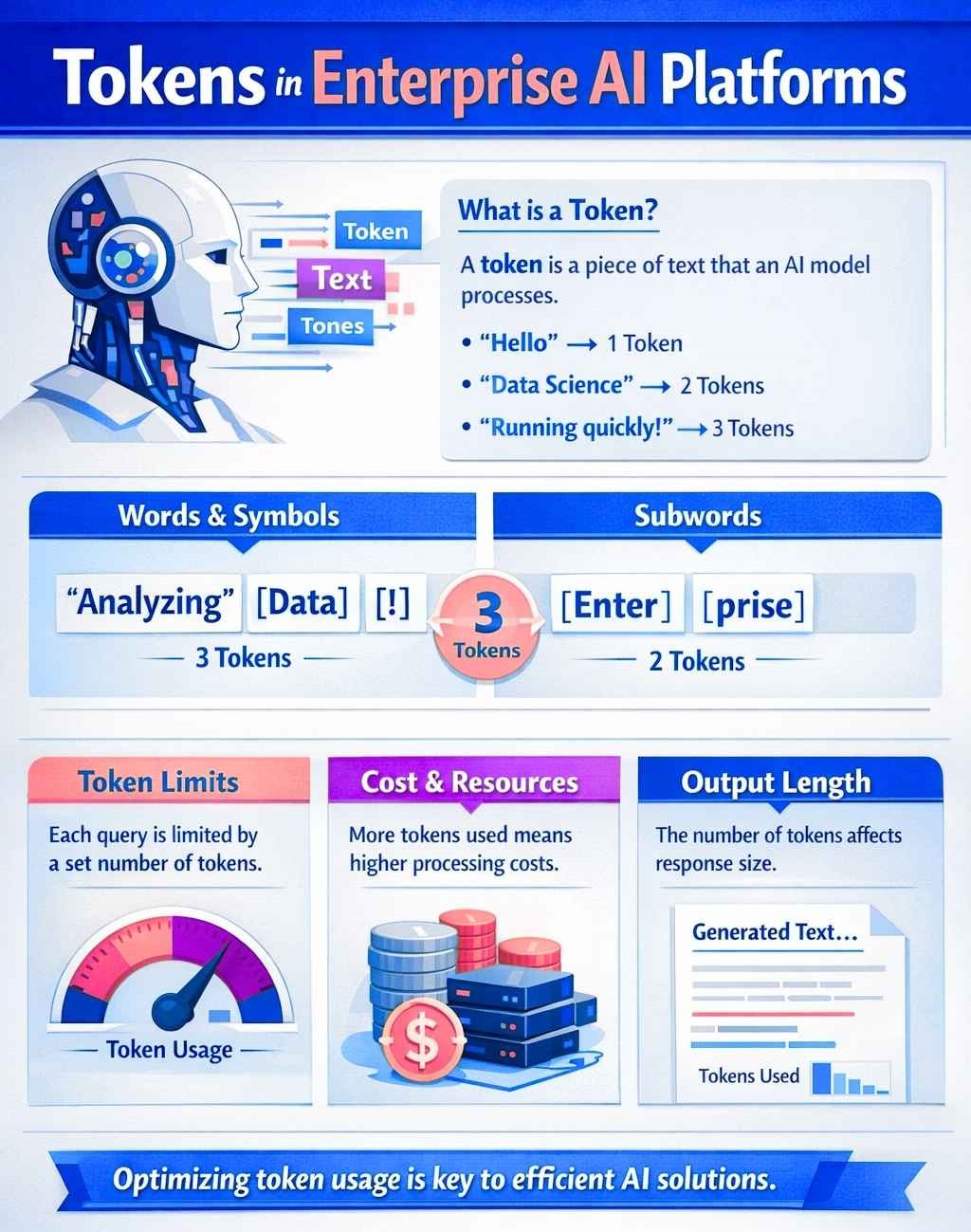
What Is a Token?
Before comparing costs, it helps to understand what you're actually paying for. Most enterprise AI platforms bill usage in tokens rather than words, messages, or pages. A token is roughly equivalent to four characters of text or about three-quarters of an average English word.
Every interaction with an AI model involves two types of tokens: input tokens, which are the text you send, including documents, context, or conversation history, and output tokens, which are the text the model generates in response. Both count toward your bill. Output tokens typically cost more than input tokens because generating text requires more computational work than reading it.
For subscription-based enterprise plans, you typically pay a per-seat fee for access, but increasingly also incur usage-based costs depending on how heavily the system is used. The token concept matters most when your team is building products on top of AI using APIs, deploying automation, exceeding included usage thresholds, or evaluating whether a flat subscription or pay-as-you-go usage is the better fit.
A practical example: a company processing 5 million input tokens and 2 million output tokens per month using Claude Sonnet at $3 per million input tokens and $15 per million output tokens would pay about $45 per month in API fees. At that scale, direct API usage is negligible compared to seat licensing. Costs become material when usage reaches hundreds of millions or billions of tokens per month, which is more typical of automation, product development, and large-scale batch processing than standard employee usage.
ChatGPT Enterprise and Business (OpenAI)
OpenAI offers business customers a self-serve ChatGPT Business workspace as well as custom Enterprise deployments. ChatGPT Business currently runs $20 per user per month on an annual commitment, or $25 per user per month month to month, with a minimum of two seats. Business plan data is not used to train OpenAI's models by default.
ChatGPT Enterprise carries custom pricing through OpenAI's sales team. Enterprise adds expanded context windows, advanced security and administrative controls, role-based access controls, SCIM, encryption key management, custom retention policies, billing and invoicing support, and enterprise support options.
One important shift in 2026 is how OpenAI structures access inside ChatGPT Business and Enterprise. Core chat access remains subscription-based, but advanced features increasingly rely on flexible pricing through credits and shared usage pools. That means the economics are no longer defined by seat count alone. Buyers also need to understand whether users will rely on features such as agent mode, deep research, advanced reasoning behavior, image generation, or voice.
SCIM is an open standard protocol that automates identity management across applications. In practical terms, it lets your IT team add, update, or remove employee access to tools such as ChatGPT, Claude, or Copilot automatically instead of manually updating each system. Single sign-on controls how users authenticate. SCIM controls who has access and keeps that list synchronized. You generally want both.
Data Policy Distinction
The most important data policy distinction comes down to plan tier. Consumer-level AI plans often require closer scrutiny because data handling defaults differ from business agreements. On paid OpenAI Business and Enterprise plans, business data is not used to train OpenAI's models by default.
For regulated industries, contract detail matters more than marketing language. Enterprise deployments can also support more advanced privacy and retention requirements, but the exact protections depend on the agreement you sign and the control set you enable.
API access is billed separately from ChatGPT subscriptions. A ChatGPT Business or Enterprise subscription does not include OpenAI API usage, and the API has its own token-based pricing structure.
Claude for Business and Enterprise (Anthropic)
Anthropic structures its commercial offering around Team and Enterprise deployments with centralized administration, identity integration, configurable retention, and governance controls designed for enterprise buyers. Anthropic also offers premium seat options that bring together Claude and Claude Code for users who need more development-oriented functionality.
In 2026, Anthropic's commercial structure clearly moved away from a simple flat subscription model. Seats include enough usage for a typical workday, but additional usage can be enabled and billed at standard API rates, with administrators able to set spend controls. In practice, that means Claude deployments are increasingly governed by both seat access and actual consumption.
Enterprise adds deeper governance controls, auditability, identity management, configurable data retention, and support for regulated environments. Anthropic states that customer prompts and responses are not used to train its models by default in Claude Enterprise.
One practical note for buyers is that Anthropic does not frame usage in the same simple way some competitors do. Included usage can vary by model, interaction type, attached files, and how teams use the system. That makes capacity planning more important for organizations with heavy or predictable workloads.
Claude has gained significant enterprise traction in 2026, particularly among technical teams and organizations prioritizing long-context processing, output consistency, and document-heavy workflows. It is frequently selected for due diligence, research synthesis, contract analysis, and code review where reliability matters more than speed.
Anthropic's Constitutional AI approach remains a differentiator for businesses where output reliability and predictable behavior are procurement criteria, particularly in legal, healthcare, financial services, and high-trust knowledge work.
Microsoft 365 Copilot
Copilot is structurally different from the other three platforms because it is not a standalone product. It depends on an existing qualifying Microsoft 365 subscription. Microsoft 365 Copilot Business is currently listed at $18 per user per month paid yearly, with a qualifying Microsoft 365 plan required. Larger enterprise Copilot licensing is typically handled through Microsoft sales and licensing channels.
That stacking matters for budget analysis. Copilot is an add-on layered on top of Microsoft 365, not a replacement for it. For businesses already paying for Microsoft 365 Business or Enterprise plans, Copilot increases total per-user spend materially.
The value proposition for Copilot is tight integration with the Microsoft 365 ecosystem. Unlike a standalone chat interface, Copilot works inside Outlook, Teams, Word, Excel, PowerPoint, and other Microsoft applications, grounded in organizational data through Microsoft Graph.
In practice, the cost of Copilot is rarely limited to the seat license. The value and the risk are both tied to how it connects to email, SharePoint, Teams, file storage, and collaboration data. Organizations deploying Copilot at scale are increasingly investing in data classification, access governance, and tenant cleanup before rollout, because Copilot will surface whatever users already have access to.
Autonomous and custom agent use cases introduce additional costs because Microsoft requires an Azure subscription for agents and also offers Copilot Studio capacity for more advanced scenarios. That usage should be modeled separately from the core Copilot license before broad deployment.
Microsoft has also announced commercial Microsoft 365 suite pricing changes effective July 1, 2026, with new pricing applying at renewal after that date. That affects the base subscription cost underlying Copilot deployments even though Copilot itself is priced separately.
Gemini for Google Workspace
Google took a different approach than its competitors by bundling Gemini AI into Google Workspace Business and Enterprise plans rather than keeping it as a separate business add-on. Business Standard currently runs $14 per user per month on an annual commitment. Business Starter is $7, and Business Plus is $22.
The practical implication is that every Workspace user on the relevant plan now has Gemini access whether they use it or not. For companies that want controlled, phased AI rollout, this bundled model introduces governance challenges. Many organizations are disabling or limiting certain Gemini features at the administrative level until data access, sharing policies, and internal AI usage guidelines are more clearly defined.
Google states that Gemini capabilities inside Workspace are included in Business and Enterprise plans and that customer data is not used to train the models for those business products. For compliance-sensitive organizations, contract review still matters, especially where regulated data, retention, or BAA requirements are involved.
For businesses already in the Google ecosystem, Gemini's integration across Gmail, Docs, Meet, Drive, and related tools is seamless. Google also positions Gemini strongly for long-document and research workflows, especially when paired with NotebookLM and Workspace-native collaboration.
Enterprise Pricing at a Glance
- ChatGPT Business (OpenAI): $20/user/month annually or $25/user/month monthly, 2-seat minimum; advanced usage can also draw from shared credits under flexible pricing.
- ChatGPT Enterprise (OpenAI): Custom pricing with enterprise controls, advanced privacy terms, expanded context, volume discounts, and shared credit pools.
- Claude Team / Enterprise (Anthropic): Team and Enterprise combine seat access with additional usage billed at API rates when needed; enterprise pricing is custom and emphasizes governance controls.
- Microsoft 365 Copilot Business: $18/user/month paid yearly with a qualifying Microsoft 365 plan; agents require Azure and introduce additional metered costs.
- Google Workspace Business Standard with Gemini: $14/user/month annually; Gemini is bundled into Workspace Business and Enterprise plans.
Note: Seat-based pricing, in-product flexible pricing, and API pricing are not the same thing. A growing number of enterprise AI plans now combine more than one billing model.
Considerations for Business Buyers
Pricing is only one variable in the decision. Several other factors carry equal or greater weight for businesses with compliance requirements, regulated data, or specialized workflows.
Data privacy defaults matter more than the headline price. All four platforms protect business data differently under their paid business and enterprise tiers. Google bundles Gemini into Workspace. Microsoft protects business data contractually in Microsoft 365. OpenAI and Anthropic each use enterprise agreements and administrative controls to govern retention, access, and business-data use. Understanding exactly what your contract says, not what the marketing page implies, is the appropriate due diligence standard.
Context window size and workflow fit affect what the AI can handle in a single session. That matters for organizations analyzing long contracts, large codebases, complex research, or multi-document workflows. But context size alone should not drive the decision. Reliability, governance, connector support, and actual employee workflow often matter more.
Total cost of ownership extends beyond seat licenses. Implementation, training, governance infrastructure, access cleanup, usage-based overages, and in some cases agent or automation metering all add to the real annual number. A cheap seat price can still produce a more expensive deployment if governance is poor or usage expands quickly.
Finally, the right tool is often determined by where your team already works. Copilot's advantage is integration into Microsoft 365 workflows. Gemini's advantage is the Google ecosystem. Claude and ChatGPT function as more platform-agnostic tools and are generally stronger choices when the primary use case is writing, analysis, research, coding, or integration into custom workflows.
Start With Policy, Not Subscription
Before any procurement decision, businesses should understand how teams are already using AI. In many cases, employees are using consumer-grade tools on personal accounts before any enterprise agreement is in place. That creates data exposure no enterprise license can retroactively fix.
By mid-2026, most businesses are not starting from zero. Employees are already using AI tools through personal accounts, browser extensions, and embedded features inside platforms like Microsoft 365 and Google Workspace. That means AI usage is already happening without full visibility, logging, or governance. Enterprise licensing does not eliminate this risk. It only provides a path to manage it.
Download a free AI Usage Policy on the STACK AI Hub.
"Understanding your company AI use cases is essential," said Rich Miller, CEO of STACK Cybersecurity. "You need to understand what you need AI tools to do before you can make an informed purchase."
Need Help Implementing AI Solutions?
STACK Cybersecurity provides comprehensive AI readiness assessments, including licensing analysis, security implementation, governance planning, and ongoing monitoring. We help you understand which AI tools align with your business needs and budget while ensuring the right security controls are in place.
Email: info@stackcyber.com
Phone: (734) 744-5300