Check Student Digital Backpacks for Safety
Originally Published: Aug. 17, 2026
By Tracey Birkenhauer, journalist and Chief Impact Officer, STACK Cybersecurity
Executive Summary
Back-to-school preparation usually starts with supplies, schedules, and permission slips. Parents should also check the digital information their children carry through phones, tablets, laptops, school accounts, gaming platforms, and artificial intelligence (AI) tools.
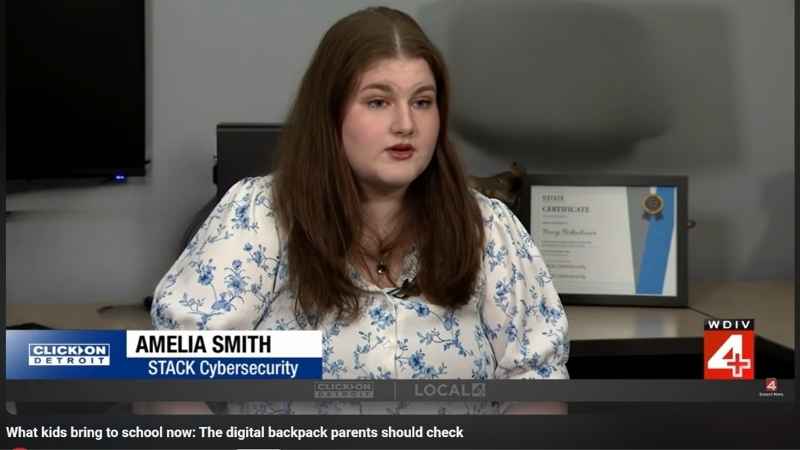
In an Aug. 17, 2026, WDIV-Channel 4 ClickOnDetroit segment, Amelia Smith, an AI business analyst with STACK Cybersecurity, described the emerging concept of the "digital backpack," the data, accounts, activity, and online interactions connected to a student's everyday technology use.
Parents don't need to become cybersecurity experts. They do need to review location sharing, app permissions, AI use, gaming chats, phishing risks, and cyberbullying concerns with the same regularity they use to check a physical backpack.
"It used to be we talked about how to get your kid's backpack ready, but now it’s all about what’s in their digital backpack — things like what’s on their laptops, tablets, and phones," said WDIV-Channel 4 Reporter Shawntee Passmore.
Students carry more than books into the classroom.
A phone in a backpack may hold years of location history, private messages, school logins, app activity, forgotten WiFi connections, gaming contacts, photos, videos, and chatbot prompts. A school-issued device may connect to classroom platforms, cloud storage, digital certificates, and public networks. A gaming account used after school may expose a child to strangers, scams, bullying, or dangerous links.
That collection of information makes up the digital backpack.
Why STACK Cybersecurity Covers Family Digital Safety
STACK Cybersecurity is a business-to-business managed IT, cybersecurity, AI enablement, and compliance firm. Most of its work protects manufacturers, defense contractors, law firms, health care practices, and financial services companies. Covering topics such as digital backpacks falls under STACK's community outreach efforts, not its core service line.
STACK approaches that outreach with a simple premise: cybersecurity is homeland security. Every family that locks down a gaming account, every student who learns to spot a phishing email, and every parent who reviews an app's permissions closes off a path a hacker could otherwise use. When one household, school, or business raises its defenses, the broader community becomes a harder target for the criminal groups and foreign actors who profit from exploiting the least protected targets first.
Artificial Intelligence Readiness Evaluation (AIRE)
STACK Cybersecurity developed a custom evaluation tool for businesses of all sizes to gauge their AI readiness. Our comprehensive assessment offers you a custom score. Select the button below to start your evaluation.
Digital Backpack Origin
The term "digital backpack" didn't start as a cybersecurity phrase. Researchers James Basham, Helen Meyer, and Ernest Perry introduced it in a 2010 paper published in the Journal of Research on Technology in Education, titled "The Design and Application of the Digital Backpack" The authors described the digital backpack as a set of digital tools and learning experiences students carry between classrooms, museums, and other learning environments, built on the framework of universal design for learning.
That original concept focused on access and inclusion. Fifteen years later, the same term describes something broader and riskier: the full set of accounts, devices, data, and AI interactions a student carries through daily life, both inside and outside the classroom.
Colleges Issue Digital Backpacks
The digital backpack concept didn't stay in K-12 education. Several universities now use the term to describe the technology bundle they issue to incoming students.
Arizona State University runs an Arizona State University: ASU Digital Backpack initiative that gives students access to a curated set of technology tools, including AI applications, meant to prepare them for the workforce, according to Arizona State's technology office. The university notes that AI use policies vary by course, so students are told to check with instructors before relying on AI tools for assignments.
Stevens Institute of Technology issues a Student Digital Backpack that bundles Microsoft 365, OneDrive cloud storage, Zoom, the LastPass password manager, campus WiFi access, and mobile apps for student accounts, campus safety alerts, and coursework, according to Stevens' IT resource page.
The pattern matters for parents. A student's digital backpack doesn't end at high school graduation. It grows heavier through college and into the workforce, which makes early habits around passwords, permissions, and AI use easier to build early than to correct later.
Start With Location Sharing
Location sharing is one of the simplest settings to overlook and one of the most important to review.
Many apps request location access during installation. Children may approve the request without understanding how the information could be used, stored, or shared. Location data can reveal where a student lives, attends school, practices, works, or spends time with friends.
Parents should review location permissions at the device level first. If location services aren't necessary, turn them off. If a family uses a tracking app for safety, location access should be limited to that app and reviewed regularly. The WDIV-Channel 4 segment demonstrates how easy it is to change this setting.
The Federal Trade Commission (FTC) notes that children's online privacy protections can apply to personal information such as a child's physical location, photos, videos, audio recordings, identifiers, and data that can track activity over time. Parents should treat location access as personal information, not as a harmless convenience. That framing lines up with what a digital backpack actually contains: location history, app metadata, network connections, AI prompts, digital credentials, and online conversations, all in one place.
Talk About AI
AI is already part of school life. Students may use AI tools to summarize articles, brainstorm ideas, organize research, translate concepts, or ask for help understanding a topic.
Risk aren't limited to cheating. Students may type private information into a chatbot without realizing where that information could go, how it could be stored, or whether it could be used to train a model or surface in future outputs. Many schools now provide access to AI features built into existing classroom platforms, which means students may encounter AI tools even when a teacher hasn't assigned them.
"We really don’t know what exactly is happening in that training process," STACK's Smith said. "So that’s just one example of an inherent risk that could be undertaken when utilizing apps, especially AI."
A useful rule: Don't enter anything into a free or unpaid AI tool that wouldn't be acceptable posted publicly. That includes a student's full name, school, address, phone number, login credentials, medical information, family details, private photos, or information about classmates. Students should also understand that AI tools can produce inaccurate information, so they still need to verify facts, use assigned sources, and follow classroom rules.
Smith draws a clear line between the two uses. She describes AI as a strong research companion but not a substitute for writing, since drafting a sentence includes figuring out what a student wants to say. Smith's broader point: students will use AI whether adults set rules or not, so families and schools must adopt and enforce guardrails now rather than a ban that gets ignored.
Consider Gaming Chats Equal to Social Media
Many parents review social media accounts but miss gaming platforms, leaving a major part of a child's digital backpack unchecked.
Online gaming can include voice chat, direct messages, friend requests, shared links, and group communities. StopBullying.gov notes that cyberbullying can happen in online games, and that anonymity can make harassment easier and accountability harder. The site also warns that some players may try to obtain personal information, including usernames and passwords, or post links that appear game-related but contain malware.
Parents should review privacy and communication settings inside gaming accounts, not just on the device. Depending on the child's age, that may include disabling open chat, limiting friend requests, blocking direct messages from strangers, and explaining how to report abusive behavior.
Free Download
Deepfake Compliance Checklist
TAKE IT DOWN Act requirements, 30-state election disclosure obligations, and internal controls for every business type.
School-Themed Phishing Works Because It Looks Routine
Back-to-school season brings a flood of emails, forms, portals, payment notices, sports updates, lunch account messages, transportation alerts, and classroom app invitations.
Cybercriminals know families expect school-related messages, which makes fake school notices and phishing emails more believable.
Phishing is a scam that tricks people into clicking harmful links, opening fake attachments, or entering sensitive information into a fraudulent website. The Cybersecurity and Infrastructure Security Agency (CISA) warns that phishing messages may use suspicious links, unexpected requests, urgent language, or messages that appear to come from a known contact.
Parents should save official school domains, use known school phone numbers to verify suspicious messages, and avoid logging into school accounts through links in unexpected texts or social media posts. If a message claims to involve a school closure, payment, grade issue, account lockout, or urgent student matter, confirm it through the school's official website, app, or office number.
"So there have been fake accounts of schools putting out misinformation," Smith said. "It could be as innocuous as something like a false snow day, or it could be as large as saying we sent out an email and then you check the email and it’s actually containing a phishing link. And now they’ve captured your information."
Last year, Livonia Public School had an issue similar to this, Passmore said.
Cyberbullying Follows Students Home
Cyberbullying can happen through text messages, social media posts, group chats, gaming platforms, fake profiles, and shared images. The platform changes, but the harm can be the same.
StopBullying.gov advises parents to talk openly with children about online risks, review privacy and security settings, stay current on apps and gaming platforms, and know how to report cyberbullying. Monitoring tools can help, but they work best paired with direct conversations and clear expectations.
Parents should also check both sides of the issue. A child may be targeted, participating, encouraging others, or staying silent while harmful behavior spreads. Keeping communication open increases the odds a child will come forward before a situation escalates.
Parent Checklist for Digital Backpacks
Parents can review these settings and habits with their children.
- Turn off location access where it isn't needed, and limit it to specific apps when there's a safety reason to keep it on.
- Check app permissions for contacts, photos, microphone, camera, Bluetooth, and location.
- Set clear rules for what should never go into a chatbot, and confirm what the school allows.
- Review gaming settings, including direct messages, open chat, friend requests, and sharing with unknown players.
- Verify school messages through official websites, apps, and known phone numbers rather than links in unexpected messages.
- Talk about cyberbullying, including what to do if a child is targeted, witnesses bullying, or makes a mistake online.
- Use a password manager to create strong, unique passwords for school accounts, email, gaming platforms, and cloud services.
- Turn on multi-factor authentication (MFA) where it's available. MFA requires a second verification step, such as a code or app prompt, in addition to a password.
- Check privacy settings more than once, since apps, devices, and school platforms change settings over time.
Cybersecurity a Year-Round Habit
The start of a new school year is a good time to review the digital backpack, but it shouldn't be the only time.
Children install new apps, join new chats, receive new devices, change passwords, use new classroom tools, and meet new people online throughout the year. One review won't catch everything.
Parents can make the topic easier by connecting cybersecurity to normal school routines, checking the digital backpack when checking grades, signing forms, reviewing sports schedules, or preparing for parent-teacher conferences.
Small habits reduce risk. They also teach children that privacy, safety, and good judgment are part of using technology.
Frequently Asked Questions
What is a digital backpack?
A digital backpack is the collection of information connected to a student's devices, apps, school accounts, online activity, gaming profiles, AI tools, and digital records.
Why should parents review location sharing before school starts?
Location sharing can reveal where a child lives, attends school, practices, works, or spends time. Parents should limit location access to apps that need it for a clear reason.
Can students safely use AI tools for school?
AI tools can help with research, outlining, brainstorming, and studying when a teacher allows it. Students shouldn't enter personal information, private details, login credentials, or unverified claims into those tools.
Why are gaming chats a cybersecurity concern?
Gaming chats can expose children to strangers, abusive language, scams, malicious links, cyberbullying, and attempts to collect personal information. Parents should review privacy, chat, and friend-request settings inside gaming accounts.
How can parents spot fake school messages?
Parents should be cautious with unexpected messages that include urgent language, links, attachments, payment requests, account warnings, or unofficial social media posts. When in doubt, verify through the school's official website, app, or published phone number.
Where did the term "digital backpack" come from?
Researchers James Basham, Helen Meyer, and Ernest Perry introduced the term in a 2010 paper on universal design for learning. The original concept described digital tools and learning experiences students carried between classrooms, museums, and other settings. The term has since expanded to cover the accounts, devices, and AI interactions students carry through daily life.
Do colleges use digital backpacks too?
Yes. Arizona State University and Stevens Institute of Technology/a> both use "digital backpack" to describe the technology bundles, including AI tools, cloud storage, and password managers, that they issue to incoming students.
STACK Cybersecurity's Community Outreach
STACK Cybersecurity is a business-to-business managed IT, cybersecurity, AI enablement, and compliance firm. It publishes content like this as part of its community outreach because it believes cybersecurity is homeland security. Businesses that want to talk with STACK about managed IT, cybersecurity, AI enablement, or compliance can email info@stackcyber.com or call (734) 744-5300.
Cybersecurity Consultation
Is your company secure against cyber threats? If you're not sure, it's time for a cybersecurity risk assessment (CSRA). STACK Cybersecurity's CSRA will meticulously identify and evaluate vulnerabilities and risks within your IT environment. We'll assess your network, systems, applications, and devices. You'll get a detailed report and action plan to improve your security posture. Don't wait until it's too late.