Microsoft Expands Copilot Studio with GitHub Copilot Harness
Originally Published: Aug. 4, 2026
By Tracey Birkenhauer, journalist and Chief Impact Officer, STACK Cybersecurity
Microsoft is giving businesses more ways to build AI agents that can do more than answer questions. The new GitHub Copilot harness for Copilot Studio is designed to handle complicated, multi-step work across files, applications, workflows, tools, and other AI agents.
For business leaders, the announcement represents another step toward autonomous AI. Instead of simply helping an employee draft an email or summarize a document, an AI agent may be able to gather information, make decisions within defined limits, update systems, trigger workflows, and escalate exceptions for human review.
Those capabilities could save time and reduce repetitive work. They also create new cybersecurity, governance, compliance, and accountability concerns.
Executive Summary
Microsoft announced the general availability of the GitHub Copilot harness for Copilot Studio on Aug. 3, 2026. The new framework is intended for AI agents that need advanced reasoning, workflow orchestration, multi-tool execution, coding capabilities, file analysis, and agent-to-agent interactions.
The GitHub Copilot harness moves Copilot Studio beyond traditional conversational agents. Businesses can use it to build agents that work through long-running processes involving several systems, changing conditions, and multiple decision points.
Companies considering autonomous AI should review permissions, data access, approval requirements, logging, third-party connections, billing, and employee use before deploying agents in production.
Copilot Cowork Strategy
The GitHub Copilot harness isn't an isolated announcement. It aligns with Microsoft's broader push toward agentic AI, including Microsoft 365 Copilot Cowork.
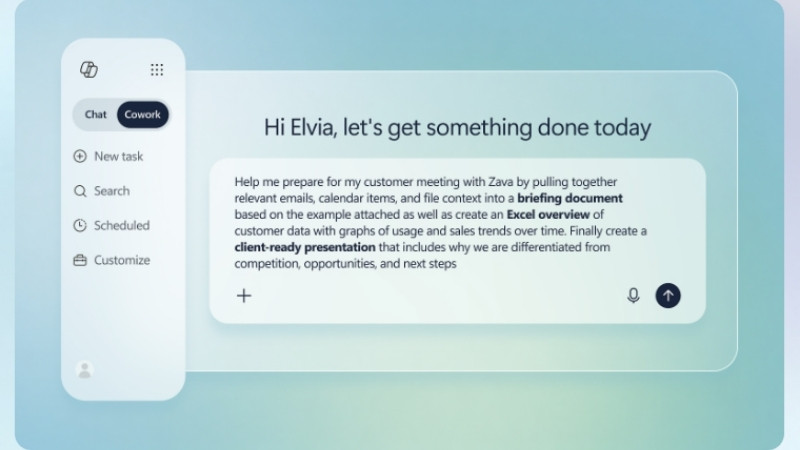
Copilot Cowork is designed for delegation. Instead of simply answering questions, Cowork can plan tasks, gather information, create documents, schedule meetings, draft communications, and complete multi-step work across Microsoft 365 while requesting approval for important actions.
The GitHub Copilot harness brings similar capabilities to Copilot Studio, where developers and businesses can build custom AI agents for their own workflows. Rather than using Microsoft's built-in scenarios, companies can create agents that support business processes such as procurement, compliance, customer service, onboarding, or cybersecurity investigations.
Taken together, these announcements show Microsoft's direction for enterprise AI. The software giant is moving beyond chat-based assistants toward more sophisticated AI systems that can reason through problems, coordinate multiple tools, and complete work while keeping users involved at important decision points.
AI Agents Moving Beyond Conversation
Most companies started using generative AI for relatively simple tasks. Employees ask questions, draft communications, summarize meetings, create documents, research topics, or analyze basic information.
Microsoft's latest Copilot Studio update points to a different kind of AI use.
An autonomous agent isn't limited to suggesting what someone should do next. It may complete much of the work itself by planning a task, selecting tools, reviewing files, interacting with applications, and completing approved actions.
That difference matters. A chatbot usually produces an answer. An autonomous agent may change records, launch workflows, create files, send communications, or connect with another agent to complete a larger business process.
The more authority an AI agent has, the more important security and governance become.
What Is the GitHub Copilot Harness?
The GitHub Copilot harness is a new framework inside Microsoft Copilot Studio. Microsoft designed it for complex, long-running processes that require advanced reasoning, several tools, and multiple information sources.
According to Microsoft, agents using the new harness can plan tasks, reason through changing conditions, analyze files and code, use integrated workflows, connect with outside platforms, and produce detailed, multi-part results.
The harness can also support agent-to-agent interactions. That means one AI agent may be able to coordinate with another specialized agent as part of a larger workflow.
A vendor onboarding agent, for example, could collect required documents, review submitted information, check company policies, request missing records, update a business system, route the package for approval, and notify the employees involved.
A security investigation agent could gather alerts from several tools, review supporting files, summarize activity, prepare a report, and send unusual findings to an analyst.
Pricing Differences
Many Microsoft 365 subscriptions now include access to Copilot experiences, and some businesses also license the premium Microsoft 365 Copilot capabilities.
The GitHub Copilot harness works differently. Microsoft says agents built with the harness use consumption-based billing through Copilot Credits, even if the business already has Microsoft 365 Copilot available to its users.
Instead of paying only for employee access, businesses also pay for the work autonomous agents perform. As an agent reasons through tasks, analyzes files, calls tools, connects to business systems, or runs workflows, it consumes Copilot Credits that are billed based on usage.
Per-User Licensing Versus Usage-Based Billing
- Microsoft 365 Copilot: Generally licensed per employee for a set monthly or annual price.
- GitHub Copilot harness: Billed according to the Copilot Credits consumed while building, testing, evaluating, and running an agent.
- Microsoft 365 Copilot: Costs are largely based on how many employees receive licenses.
- GitHub Copilot harness: Costs vary based on agent design, model selection, tools, data, task complexity, and usage.
Microsoft 365 Copilot pricing is based mainly on access, while GitHub Copilot harness pricing is based on consumption.
With Microsoft 365 Copilot, you can estimate much of its cost by counting the employees who need licenses. With the GitHub Copilot harness, you also must estimate how frequently an agent will run, how complicated its tasks will be, which models it will use, and how many tools or data sources it will call.
What Are Copilot Credits?
Credit usage scales with task complexity, driven by intermittent steps and capabilities involved, according to Microsoft. The Copilot Credits Guide (PDF) explains the new pricing model in great detail.
Credits can be consumed by the large language model (LLM), the agent harness, connected tools, knowledge sources, Model Context Protocol (MCP) connections, workflows, and other features used during a task.
The number of credits required can change from one task to another. A short request involving limited information may use fewer credits than a long-running process that reviews several files, calls multiple tools, uses a more advanced model, and produces a detailed result.
Microsoft currently offers pay-as-you-go billing and prepaid Copilot Credit options. Under the pay-as-you-go model, credits are measured as they're consumed and billed after the end of the billing period.
Current pricing and licensing terms can change, so businesses should review the latest Microsoft Copilot Studio pricing and Microsoft's Pricing Calculator.
Billing Can Begin Before an Agent Is Published
One important difference is that usage charges may begin while the agent is still being built.
Microsoft says the GitHub Copilot harness can consume Copilot Credits during authoring, previewing, testing, and evaluation. Users don't necessarily have to publish an agent or make it available to employees before usage costs begin.
Activities that may consume credits include:
- Creating an automated solution with natural language
- Previewing and testing an agent
- Generating agent evaluations
- Running evaluations
- Using models, tools, workflows, and knowledge sources
- Running the agent in production
That makes development oversight important. Experimental agents, repeated testing, and unfinished workflows can create costs before the business receives any production value.
Why Agent Design Affects Cost
Two agents completing similar tasks may not consume the same number of credits.
An agent's cost may be affected by:
- The model selected for the task
- The amount of information sent to the model
- The length of the response
- The number of connected tools
- The number and size of files analyzed
- The amount of company context provided
- The number of steps in the workflow
- How often the agent runs
- How many employees or customers use it
- Whether the agent repeats failed steps
A poorly designed workflow may use more credits than expected. An agent could repeatedly call the same tool, process unnecessary information, use an expensive model for a simple task, or continue working through a process that should have stopped and requested human help.
Businesses should test both performance and cost before making an agent widely available.
Usage-Based Billing Changes the Budget Discussion
With regular Microsoft 365 Copilot licensing, a leader may begin by asking how many employees need access.
With the GitHub Copilot harness, you should ask:
- How often will the agent run?
- How many people or systems will use it?
- Which model does the task require?
- How many tools will the agent call?
- How much data will it process?
- How long could each workflow take?
- What happens when a task fails?
- Can the agent retry a process without approval?
- Who will monitor credit consumption?
- What spending limit should apply?
This makes the GitHub Copilot harness less like purchasing a fixed software seat and more like paying for cloud infrastructure or metered computing. Costs can rise or fall with activity.
Cost Controls Are Part of AI Governance
Usage monitoring shouldn't be treated as an accounting task alone. It's part of responsible AI governance.
A sudden increase in Copilot Credit consumption may indicate growing adoption, but it could also point to a failed workflow, excessive retries, poor agent design, unauthorized use, or a compromised process.
Microsoft allows administrators to review credit consumption in Copilot Studio and the Power Platform admin center. Businesses should assign responsibility for reviewing that activity and responding to unusual increases.
Before an agent enters production, users should:
- Estimate expected monthly use
- Set a pilot budget
- Monitor credit consumption during testing
- Review which models and tools drive the most usage
- Set alerts or spending controls where available
- Investigate unexpected increases
- Compare the agent's cost with the time or expense it saves
- Reassess the workflow as usage grows
The goal isn't simply to reduce AI spending. It's to make sure the cost remains connected to a useful and measurable business result.
GitHub Copilot Harness Capabilities
- Advanced planning and reasoning
- Long-running, multi-step workflows
- Multi-tool execution
- File and source code analysis
- Connections to outside platforms
- Agent-to-agent interactions
- Rich, multi-part outputs
- Work across multiple business systems
Why This Matters to SMBs
Advanced business automation once required custom development, robotic process automation, or a large technology project. Platforms such as Copilot Studio are making these capabilities more accessible to smaller firms.
You can leverage AI agents to help with employee onboarding, customer service, vendor reviews, IT requests, compliance reporting, procurement, contract intake, internal research, security investigations, and knowledge management.
Businesses already using Microsoft 365, SharePoint, Azure, Power Platform, or Dynamics may see a natural path toward AI-driven workflows because much of their data and many of their processes already exist inside the Microsoft ecosystem.
That doesn't mean every workflow should be automated.
Leaders should first understand what the process involves, which systems the agent needs to access, what information it may encounter, which decisions it can make, and when a person needs to step in.
Companies comparing Microsoft AI products can review STACK's Microsoft AI Decision Brief and Microsoft 365 Copilot Assessment.
What Microsoft Says Has Improved
Microsoft reports that internal testing found meaningful performance and quality gains when Copilot Studio agents used the GitHub Copilot harness instead of the Standard harness.
The company specifically highlighted improvements in multi-tool use, file analysis, code analysis, and knowledge quality.
Those improvements may help agents handle more demanding work, but businesses still need to test each use case inside their own environment.
An agent that performs well in a controlled demonstration may behave differently when it encounters incomplete information, unexpected file formats, unavailable tools, conflicting instructions, incorrect data, or unusual employee requests.
Testing should include both normal workflows and failure scenarios. Companies should understand what happens when an agent can't complete a task, tries to exceed its permissions, or receives information designed to manipulate its behavior.
Autonomous AI Creates Cyber Risk
An AI agent that summarizes a public document has a limited ability to cause harm. An agent that can access customer records, update accounts, trigger workflows, call outside services, or communicate with other agents requires much stronger controls.
Before deploying an autonomous agent, business leaders should answer several basic questions.
- What information can the agent access?
- Which systems can it use?
- What actions can it take?
- Which decisions can it make on its own?
- When does it need human approval?
- How will its activity be logged?
- Who is responsible when something goes wrong?
- Which outside services or agents can it contact?
- How will usage and cost be monitored?
These aren't only technical questions. They affect customer trust, legal exposure, operational reliability, regulatory compliance, and financial risk.
Limit Data and System Access
AI agents should follow the principle of least privilege. They should only have access to the information, applications, tools, and actions required for their assigned role.
Giving an agent broad access because it may be helpful later creates unnecessary exposure. If the agent is misconfigured, manipulated, or connected to an unsafe workflow, excessive permissions can turn a small mistake into a larger incident.
Access reviews should include Microsoft 365, SharePoint, OneDrive, customer relationship management systems, accounting platforms, human resources applications, databases, APIs, and third-party software.
Agent-to-agent connections deserve the same scrutiny. A tightly controlled agent can still create risk if it's allowed to share data or instructions with another agent that has broader permissions.
Keep People Involved in High-Risk Decisions
Not every step should happen automatically.
A person should remain involved when an action could affect finances, employment, customer rights, regulatory obligations, system security, or access to sensitive information.
Human approval may be appropriate before an agent sends a payment, changes user access, disables an account, submits a regulatory filing, deletes records, approves a contract, or makes a decision that affects an employee or customer.
Logging, Monitoring Essential
Businesses need a reliable record of what an AI agent did, which information it accessed, which tools it used, and whether a person approved the outcome.
Logs should be searchable, retained for an appropriate period, and reviewed when unusual activity occurs.
Security teams should consider alerts when an agent accesses an unexpected source, attempts a restricted action, creates an unusual number of requests, connects with an unapproved service, generates repeated errors, or produces an unexpected increase in usage.
Without useful logging, it may be difficult to investigate a mistake, confirm whether an approval occurred, or understand how sensitive information was handled.
Shadow AI Will Become Harder to Ignore
The easier it becomes to create AI agents, the more likely employees are to build them without involving IT, cybersecurity, legal, or company leadership.
This behavior is commonly called Shadow AI. It occurs when employees use AI tools, workflows, or agents without approval, monitoring, or security oversight.
An employee may create an agent with good intentions and connect it to customer files, contracts, internal reports, or an outside service without understanding how the data is stored or used.
A worker may also grant the agent more access than necessary because doing so makes the workflow easier to build.
Blocking every AI tool usually isn't practical. Companies need clear rules, approved platforms, employee training, and a process for reviewing new AI use cases.
Every Integration Expands Risk
Microsoft says the GitHub Copilot harness can connect with tools, workflows, outside platforms, and other agents. Those connections can make an agent more useful, but they also expand the environment that needs to be secured.
Before approving an integration, you should understand what information will be shared, where the data will be stored, how long the provider will keep it, and whether the information may be used for model training.
You should also review how authentication works, which permissions are required, whether activity is logged, how the connection can be disabled, and what contractual protections apply.
A secure Microsoft environment can still be exposed through a poorly governed third-party connection.
Usage-Based Billing Requires Oversight
Microsoft says agents running on the GitHub Copilot harness use usage-based billing, even when a business already has Microsoft 365 Copilot licenses.
Costs may depend on the models selected, the tools and business context added to the agent, and the amount of runtime used. Some AI-assisted building, testing, and evaluation features may also generate usage charges.
Cost management should be part of AI governance.
You should set budgets, monitor usage, review unusually expensive workflows, and watch for unexpected spikes. An agent that becomes stuck in a loop, repeatedly calls an outside tool, or performs more work than intended could create both operational and financial problems.
Copilot Studio Now Supports Three Harnesses
Microsoft says Copilot Studio now supports three harnesses, each designed for a different type of work.
Copilot Studio Harnesses
- Copilot Chat harness: Designed for experiences based on Microsoft 365 Copilot Chat.
- Standard harness: Designed for conversational agents and workflows that rely on rules-based topics.
- GitHub Copilot harness: Designed for complex agentic processes that require advanced reasoning, workflows, tools, code analysis, and deeper orchestration.
Microsoft says it will continue supporting the Copilot Chat and Standard harnesses for existing and newly created agents.
A business doesn't need to move every agent to the new framework. A simple internal question-and-answer bot may not need the same level of reasoning, access, or expense as an agent that coordinates a long-running operational process.
AI Governance Should Start Before Deployment
Governance isn't something to add after an agent has already been connected to business systems.
Companies should create policies that define approved AI tools, acceptable uses, restricted information, required reviews, employee responsibilities, and consequences for misuse.
The policy should also explain who can create agents, who can approve them, how permissions are granted, how activity is monitored, and when access must be removed.
A useful AI policy shouldn't be so broad that employees can't understand it. It should give people practical guidance for the situations they encounter at work.
Employees need to know whether they can upload customer data, contracts, financial records, source code, personnel information, or internal procedures into an AI system. They also need to understand when an AI-generated result requires verification or approval.
Start with Narrow Use Cases
You don't need to automate your most complicated process first.
A safer approach is to begin with a narrow use case that has clear inputs, limited access, measurable value, and defined approval points.
Start by choosing a repetitive process employees already understand. Map each step, system, data source, decision, exception, and approval. Determine whether the agent will encounter confidential, regulated, financial, personal, or customer information.
Give the agent only the permissions it needs. Decide which actions can happen automatically and which ones require a person. Test incomplete information, incorrect instructions, unavailable tools, unusual files, and attempts to push the agent beyond its assigned role.
Enable logging before the agent enters production. Assign someone to review performance, security, cost, and employee feedback. Reassess permissions and integrations as the workflow changes.
Businesses that aren't sure where to begin can use STACK's AI Readiness Evaluation (AIRE) to identify gaps in governance, security, data handling, compliance, and implementation planning.
AI Laws and Compliance Still Apply
AI regulation continues to develop at the state, federal, and international levels. Requirements may vary based on where a company operates, which customers it serves, what kind of information it processes, and whether an AI system influences a high-impact decision. Consult the STACK AI Hub to review AI legislation, download an AI Acceptable Use Policy template, and take our AI Readiness Evaluation.
Businesses should review applicable state AI laws, including requirements emerging under Colorado AI laws and California AI laws.
Companies with customers, employees, or operations in Europe may also need to consider the EU AI Act.
Legal requirements shouldn't be the only reason to govern AI. Even when a specific law doesn't apply, clear policies and documented oversight can reduce confusion, improve accountability, and help protect the business when an agent produces an unexpected result.
A Perspective From STACK Cybersecurity
"Autonomous AI agents can create real operational value, but businesses need to understand what those agents can access and what they're allowed to do. Governance, visibility, and human oversight need to grow at the same pace as the technology."
Rich Miller, CEO, STACK Cybersecurity
The Bigger Picture
Microsoft's announcement reflects a broader move toward agentic AI: software that doesn't just assist employees but carries out work on their behalf.
That shift changes the security discussion.
When AI only generates text, businesses mainly worry about accuracy, privacy, and appropriate use. When AI can act across applications, companies also have to manage permissions, identities, workflow logic, outside connections, transaction limits, monitoring, and incident response.
Governance isn't meant to stop innovation. It gives a business a safer way to move forward.
Firms that establish clear policies, limit unnecessary permissions, test agents carefully, and monitor activity will be better prepared to take advantage of autonomous AI without losing control of their data or operations.
Five Facts About Microsoft's Announcement
- Microsoft announced the general availability of the GitHub Copilot harness for Copilot Studio on August 3, 2026.
- The harness is designed for complex, long-running work involving multiple steps, tools, information sources, and decision points.
- Microsoft says it improves multi-tool use, file analysis, code analysis, and knowledge quality.
- Copilot Studio now supports the Copilot Chat, Standard, and GitHub Copilot harnesses.
- Agents using the GitHub Copilot harness are billed based on usage, even when a business has Microsoft 365 Copilot licenses.
How STACK Cybersecurity Can Help
Autonomous AI can improve productivity, shorten workflows, and reduce repetitive work. It can also create new security and governance gaps when agents are deployed without clear policies, limited permissions, or reliable monitoring.
STACK Cybersecurity helps businesses evaluate AI readiness, identify Shadow AI, create practical governance policies, review Microsoft security controls, assess data access, evaluate third-party integrations, and prepare for emerging compliance requirements.
We can also help your company build an AI adoption plan that supports innovation without overlooking cybersecurity, privacy, compliance, or operational risk.
Frequently Asked Questions (FAQs)
What is Microsoft's GitHub Copilot harness?
The GitHub Copilot harness is a framework inside Microsoft Copilot Studio designed for AI agents that need advanced reasoning, workflow orchestration, coding, multi-tool execution, file analysis, and connections with other tools or agents.
Is the GitHub Copilot harness generally available?
Yes. Microsoft announced that the GitHub Copilot harness became generally available for production use on August 3, 2026.
How is the GitHub Copilot harness different from a chatbot?
A traditional chatbot mainly answers questions or provides information. An agent using the GitHub Copilot harness can work through multi-step processes, use several tools, analyze files, trigger workflows, and take approved actions across connected business systems.
How is Copilot Studio different from Microsoft 365 Copilot?
Microsoft 365 Copilot helps employees work inside applications such as Word, Outlook, Teams, and Excel. Copilot Studio lets companies create customized agents that can support broader workflows and connect with additional tools, data sources, and business systems.
Does Microsoft still support existing Copilot Studio agents?
Yes. Microsoft says the Copilot Chat and Standard harnesses will continue to be supported alongside the GitHub Copilot harness.
Does the GitHub Copilot harness require separate billing?
Microsoft says agents using the GitHub Copilot harness are billed based on usage, even when a business has Microsoft 365 Copilot licenses. Cost may depend on the model, tools, business context, and runtime used.
What cybersecurity risks should businesses consider?
Important concerns include excessive permissions, sensitive data exposure, unsafe third-party integrations, Shadow AI, weak logging, unexpected actions, compliance issues, prompt injection, and a lack of human approval for high-risk decisions.
Can autonomous AI agents act without human approval?
They can be configured to complete certain actions automatically. Businesses should still require human approval for high-impact activities such as payments, account changes, regulatory submissions, record deletion, and decisions that affect employees or customers.
What is Shadow AI?
Shadow AI is the use of AI tools, workflows, or agents that haven't been reviewed or approved by a company's leadership, IT, or cybersecurity team. It can expose sensitive data and create security, compliance, financial, and operational risks.
How can a business prepare for autonomous AI agents?
Start with a narrow use case, map the workflow, review the data involved, limit permissions, define approval points, test failure scenarios, enable logging, monitor costs, and assign clear ownership. STACK's AI Readiness Evaluation can help identify gaps before deployment.
Which Copilot Studio harness should a business use?
The right harness depends on the task. Copilot Chat supports Microsoft 365 Copilot Chat experiences, the Standard harness supports conversational and rules-based agents, and the GitHub Copilot harness is designed for more complicated processes involving advanced reasoning, multiple tools, workflows, and integrations.
Where can business leaders learn more about AI governance?
Visit the STACK AI Hub for AI governance guidance, security checklists, legal updates, Microsoft Copilot resources, readiness tools, and practical information for business leaders.
Considering Microsoft Copilot or autonomous AI? Start with STACK's AI Readiness Evaluation (AIRE).